The guitar practice app for beginners

Never forget a song again.

Fret Not is a free iOS app for the songs you’re learning on guitar. Save each one’s chords, strumming, capo, and tuning, so it’s ready the moment you sit down to play.

Download free
4.9 on the App Store
The Fret Not song list with a song opened to show its chord shapes
Why Fret Not exists

Does this sound familiar?

You learned a song last month, and now you can’t remember the chords, so you have to learn it all over again.

You’re partway through a song, hit a chord you can’t remember, and have to stop and look up the shape.

You want to jump straight back into the song you’re learning, and keep the ones you already know from slipping away.

You are not alone
1 in 10 who start learning guitar are still playing a year later
90 days is when most of the other nine give up

Fret Not is built for those 90 days, so you come out the far side still playing.

How it works

Set up a song once, then just play

Save each song with its chords, capo, strumming and tuning, keep your every song you've learned in one place, and add new ones in seconds.

Add a song and it's chords

Search for the song on Spotify or add type it in. Then add the chords: type them in by hand for free, or let Fret Not Pro suggest them for you. It picks chords for your skill level, with the capo that keeps even a hard song in easy, open shapes.

Pro is $3.99 a month or $29.99 a year. Everything else in the app stays free. More about Pro
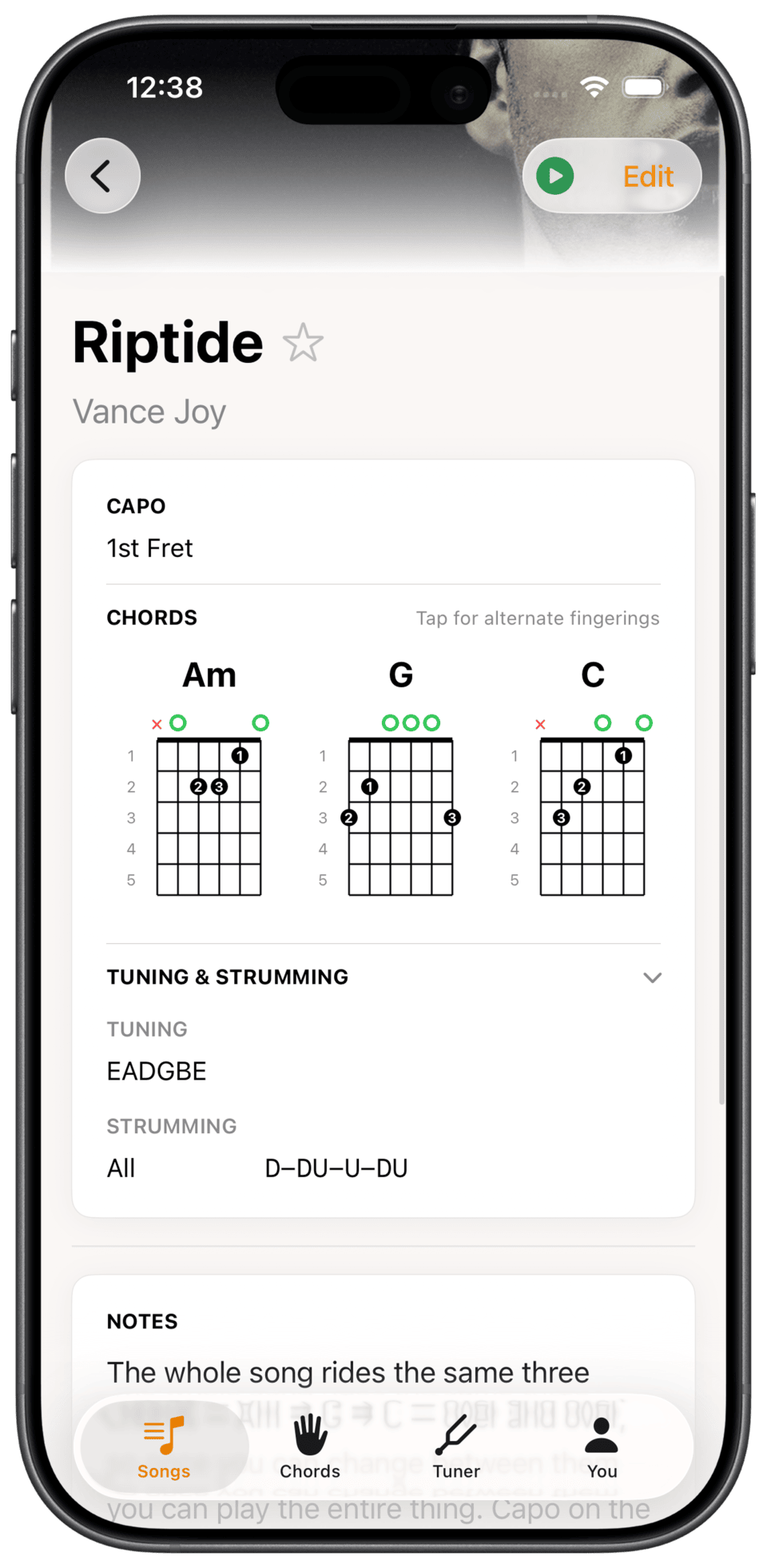
A song in Fret Not showing its chords, capo position and strumming pattern

Every detail for a song, in one spot

Chord shapes, strumming, capo, tuning, and a note about the bit that always trips you up. Play along to it with Spotify, and keep a link to the YouTube tutorial you learned it from. Open the song later and it’s all still there, instead of hunting the chords down again.

Every song you’ve learned, in front of you

Open the app and your whole songbook is there. Peek at the chords for any song without leaving the list, or play it straight from Spotify and follow along.
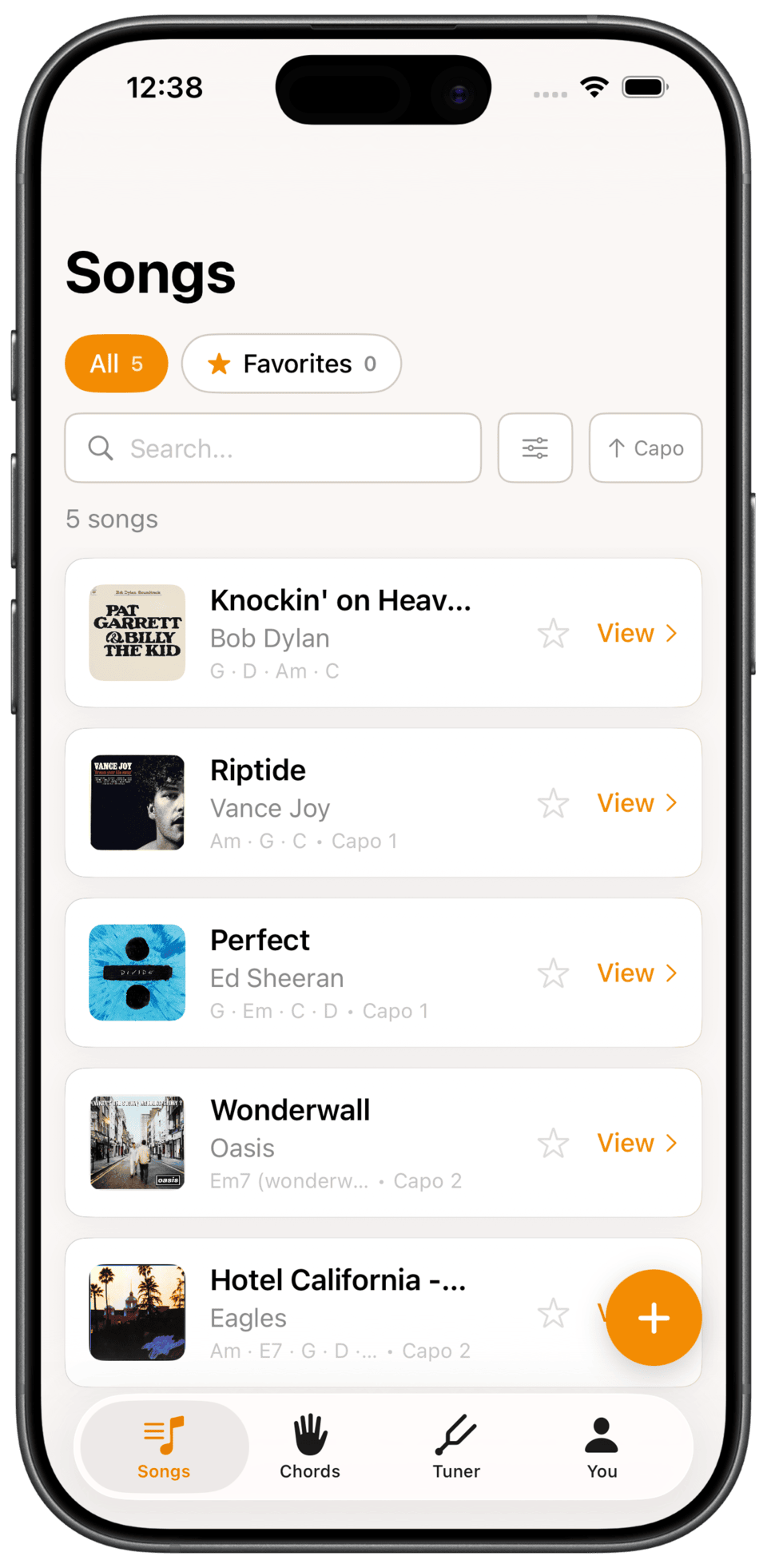
Filter by chord, so you can practice the shapes you are working on
Filter by capo position, or sort by the date you added a song
Star the songs you play most so they stay at the top
The song list in Fret Not with filters and search
More features

The rest of what you get

A reference for every chord

Browse the full chord library any time, not just the chords in your songs. Every one comes with a picture of where your fingers go.

Chord identifier

Holding a shape you cannot name? Tap it onto the fretboard and Fret Not tells you what it is, then saves it to a song or your own library.

Built-in tuner

Real-time pitch detection, string by string, with alternate tunings supported. No second app to go and find.

Build a practice streak

Fret Not counts every day you play and keeps your streak alive, with a nudge the evening before you would break it. The habit is what carries you past those first months.

Import a Spotify playlist

Bring a whole playlist in at once and every song lands in your list, so you can fill your songbook in one go instead of one at a time.

iCloud sync, no account

Your songs follow you from iPhone to iPad through your own iCloud, so your songbook is the same on every device.

FAQ

Questions, answered

What is Fret Not?

Fret Not is a free iOS app for the songs you’re learning on guitar. Save each song with its chords, capo, strumming and tuning in one place, so weeks later you can pull it up and play instead of learning it from scratch again.

How do I add chords to a song?

Two ways. For free, type them in yourself, and every chord you enter gets a full shape diagram. Or with Fret Not Pro, they are looked up for you automatically, matched to your skill level and with the capo to play them.

Does Fret Not teach you to play?

No, and that is on purpose. Fret Not is for people who already know a few chords and want to keep playing. For technique, a teacher or a video course will serve you better. This is what you open on the days in between.

How is Fret Not different from Songsterr and Ultimate Guitar?

Songsterr and Ultimate Guitar are huge reference libraries built for people who already play. Powerful, but overwhelming when you are starting out: endless versions of every song, dense tablature, and ads and clutter to wade through. Fret Not is the calm opposite: just the handful of songs you are actually learning, chord-first, with the right shapes for your level, the capo to make them easy, and your own notes. It is where you start.

Will it show me where to put my fingers?

Yes. Every chord comes with a diagram showing exactly where your fingers go, numbered finger by finger, so you are never left guessing a shape.

What is Fret Not Pro?

Pro looks up the chords for any song you add and matches them to your skill level. Instead of the barre chords other apps hand you, it suggests easy open shapes and the capo to play them with, so a song like Jolene comes back beginner-friendly at capo 4 rather than as C#m and B. It is $3.99 a month or $29.99 a year, and everything else in the app stays free.

Is there a free trial?

There is no separate trial. The app itself is free: add as many songs as you like, use the tuner and chord library, and type in chords yourself. Pro adds the automatic chord and capo suggestions on top.

Can I cancel Pro?

Any time, from your Apple subscriptions. You keep Pro until the end of the period you paid for.

If I cancel Pro, do I lose the chords it found?

No. Any chords Pro looked up are saved onto your songs and keep showing after you cancel. You just cannot run new lookups until you resubscribe.

How do you record strumming patterns for each song?

Each song has a strumming field where you write the pattern down in whatever shorthand you already use, such as D D U U D U. It sits next to the chords, so you get the rhythm and the shapes in one glance.

Does Fret Not support alternate tunings?

Yes. Each song can use standard tuning or an alternate like Drop D or Open G, and the built-in tuner is tuning-aware, so it tunes each string to whatever tuning the song is set to.

Can I add my own chord shapes?

Yes. Create custom chords with the built-in chord identifier, and pick a different voicing for any chord in a song.

Can I play the song while I practice?

Yes. Any song you link to Spotify plays straight from Fret Not, so you can hear the record and strum along with the chords on screen. Songs you add from Spotify come in with their album art, and you can import a whole playlist at once.

Do guitar chord charts work offline?

Yes. Your songs and their chord shapes live on your device, so they open with no connection at all. Looking up chords for a brand new song with Pro needs the internet, but everything already saved does not.

Do I need an account?

No. Pro is an in-app purchase through the App Store, so it follows your Apple ID. Your songs live on your device and in your own iCloud, and we never sell your personal data.

Does it sync between my iPhone and iPad?

Yes, through your own iCloud, with no account or sign-in. Add a song on one device and it shows up on the other.

Does the tuner record me?

No. The tuner listens through your microphone to detect pitch in real time. The audio is processed on your device and is never recorded or sent anywhere.

We want you to still be playing the guitar a year from now.

Fret Not helps you practice every song you've learned. Be the one in ten who sticks with it. Free on iPhone and iPad.

Download on the App Store